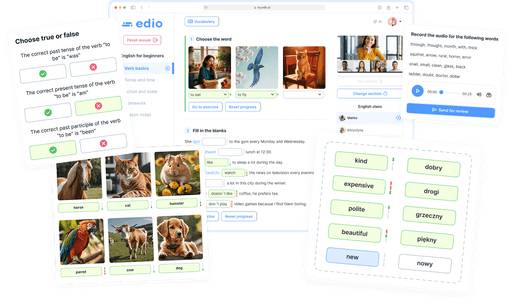






Create interactive language lessons in one minute
Turn a topic, PDF, or image into a complete, editable lesson with exercises. Teach it live, assign homework, and track student progress, all in one platform
Generate a lesson for free

Generate
Create interactive lessons from a topic, PDF or image in 1 minute
Choose where to start. edio builds an interactive lesson with exercises, ready to teach in your virtual classroom.
Try it for free
Teach
Virtual classroom for one-to-one and group online lessons
edio virtual classroom for language learning. A shared interactive space for teachers and students in real time
Teacher view
Student view
For teachers

See every student's answers in real time

Full answer history and mistake log

Emergency vocabulary tool to instantly send words to students

Hints and correct answer reveals

Student grading and attendance tracking

Built-in chat with students

Lesson balance system
For students

Real-time sync with the teacher

Automatic exercise checking with highlighted mistakes

Built-in vocabulary with quick word saving

Interactive homework

Grades, teacher feedback, and achievements

Built-in chat with the teacher

Lesson balance visibility
Start now
Class schedule and calendar for all your online lessons
Plan recurring and one-time lessons, set your working hours, and open the next class straight from the calendar
Recurring and one-time lessons
Choose the days and time once, with a start and optional end date
Your next class, one click away
Open the lesson straight from the calendar
Working hours protect your time
Set open hours for the school and each teacher, so you always see who's free to teach
One schedule, three views
Owners see the whole school, teachers see their week, students see their next lessons

Daily and weekly views

Reschedule or cancel in a click

Group and one-to-one lessons

School and teacher hours

Filter by teacher

Timezone handled for everyone
Try it for free
Built-in chat
All your school conversations in one place, no third-party messengers needed
Students, teachers, and classes: every conversation lives inside edio. Open the platform and all your communication is already here
Message a student and see everything about them instantly
Lesson balance, enrolled courses, and message history, all visible right in the conversation, no switching screens
Keep your teaching team connected
Schedules, new students, important updates: discuss everything in one place without jumping between apps
Chat during the lesson without interrupting it
Students can ask questions, teachers can reply. The lesson keeps going, nothing gets disrupted
Full visibility for school owners
See all class group chats, join any conversation, and always know what's happening across your school
Lesson balance
Track each student's prepaid lessons directly in edio, with no spreadsheets or third-party tools. A lesson is deducted automatically at the start of each class, and the balance can always be adjusted manually. Turn the feature on or off any time in your school settings. With built-in messaging, lesson balance, and student profiles, edio replaces the need for a separate language school CRM.
For school owners
Always know how many lessons each student has left, and remind them to top up before they run out
For students
Full transparency: students can see their balance and complete transaction history in their personal dashboard
Lesson analytics

Student attendance

Completed lessons and their duration

Grades, achievements, and teacher comments

Student feedback after each lesson

Interactive materials
Interactive language learning materials with 24 exercise types
Learning materials in edio are built from different exercise types and work for various learning formats
Multiple exercise types in one material
Interactive, multimedia exercises for live lessons, asynchronous learning, and external integrations

Vocabulary

Quiz

Matching

True or false

Word choice

Fill in the blank

Video

Image / GIF

Audio

Notes

Article/text

Button link


Miro

Quizlet

Word Wall

Drag and Drop

Genially

Embed

Fill in the blank with image

Writing practice

Word choice by image

Teacher-reviewed audio

Teacher-reviewed writing
Create lessons faster with AI assistance
Create and edit exercises easily. The AI assistant helps with ideas and preparation
Works for different learning formats
Perfect for online lessons and asynchronous courses
Supports 17 languages
Create learning materials in 17 languages on edio

Who is edio for?
For anyone who teaches languages, runs a school, or builds courses
Language schools
AI lesson generator: one quality standard across all your teachers
Teachers, students, and learning materials, all in one platform
Lesson analytics: attendance, progress, and student results
White-label solution for a professional look without developers
Tutors
Generate a full lesson with AI in minutes, on any topic
Less prep and grading, more time to teach
Quick exercise builder with 24 interactive types and auto-checking
Student progress, grades, and attendance after every lesson
Online course creators
Build courses faster with AI-generated lessons
Create once, sell many times
Simple student and course management
Interactive lessons without technical complexity
Less time on prep and grading. edio takes care of the routine
Before

Every fresh topic means planning a lesson by hand

Hours of lesson prep from scratch

Static books and PDFs, barely any student interaction

Manually checking all student answers

Lessons, chat, scheduling and balance tracking spread across different apps and spreadsheets

With edio

AI-generated lessons from a topic, PDF or image, ready in minutes
New

Create lessons in any of 17 languages, or start with ready-made ESL materials in English

24 interactive exercise types that keep students engaged

Automatic answer checking and instant feedback for students

Everything in one platform, no switching between tools: built-in chat, analytics, lesson-balance tracking and scheduling
Olia Padiak
Co-Founder of Bee for Biz — an English school for business and professionals

Yuliia Hlukhonina
Anastasiia Rusina
Founder of Polyglot Online School

We'll show you exactly how edio works for your school setup
1
Show how interactive online lessons work in edio
2
Demonstrate learning materials, exercises, and student progress
3
Answer your questions and show how edio can fit your teaching format
Can I use edio for individual lessons?
Yes! edio allows you to host real-time, one-on-one lessons with your students, complete with live video calls, real-time synchronization, and interactive tools.
Do you support group lessons?
Yes, edio supports group lessons. You can invite multiple students to join a virtual class, and all interactions are synced in real-time to ensure a collaborative learning experience.
Can I have an interactive lesson in edio?
Absolutely! edio is built for interactive teaching. You can create dynamic lessons using various interactive elements, live quizzes, vocabulary builders, and real-time student responses.
Can I create and manage an online course?
Yes, you can create self-paced online courses with edio. Set time limits, monitor student progress, and use automated tools to check assignments and track completion.
Can I customize edio with my own branding?
Yes! Our white-label solution allows you to fully customize edio with your logo and domain, giving your language school a unique, professional look.
Which integrations does edio support?
edio integrates seamlessly with platforms like Miro, Quizlet, Google Meet, Zoom, and WordWall, making it easy to enhance your lessons with interactive tools and video conferencing.
How do I get started with edio?
Sign up for free and get 7 days of trial access, no credit card required. If you'd prefer a personal walkthrough first, you can also book a demo with our team.